Affiliate Marketing on Facebook: Groups and Pages
Written by Edward Cranmer on 14 minute read
Where affiliate links belong on Facebook, how to use groups without getting banned, and what UK creators can access today.

Facebook reaches an audience the newer platforms do not. Older generations tend to prefer it over Instagram, and its users hold more spending power. People organise into communities built around specific interests.
That structure is what makes it useful. A group about caravan touring or home baking gathers people already interested in the products you might recommend.
Getting it wrong is easy though. Posting links repetitively into groups is the fastest route to a ban, a common mistake among new creators.
This guide covers where your links belong, how to work with groups properly, what Facebook's own affiliate tools offer, and where UK creators stand with them. Everything here builds on the same foundations as affiliate marketing anywhere else.
Facebook is still the most widely used social platform, according to DataReportal.
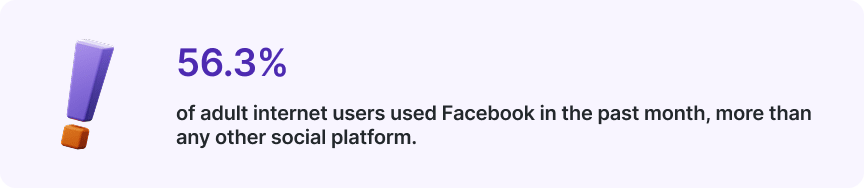
-Source: DataReportal, Global Social Media Statistics
How affiliate marketing works on Facebook
Facebook gives you three places to put a tracking link, and each reaches a different set of people.
- Groups reach people who share an interest and have never heard of you. Volume is highest here and so is the risk of being removed.
- Your page works as a home base. Links sit in posts, in the bio field and in the button beneath your cover image, with analytics showing what people click.
- Your profile reaches people who already know you. Conversion tends to be strongest, audience size smallest.
Most creators use all three, feeding traffic from groups toward a page that holds the links.
Our guide to choosing the right social platform covers how this compares elsewhere.
Facebook Affiliate Partnerships and where you can use it
Meta launched its own affiliate tool in March 2026. Creators tag products from partner retailers directly in posts and Reels, a clickable banner appears on the content, and followers tap through to buy. Commission comes from the retailer, who also sets the rate.
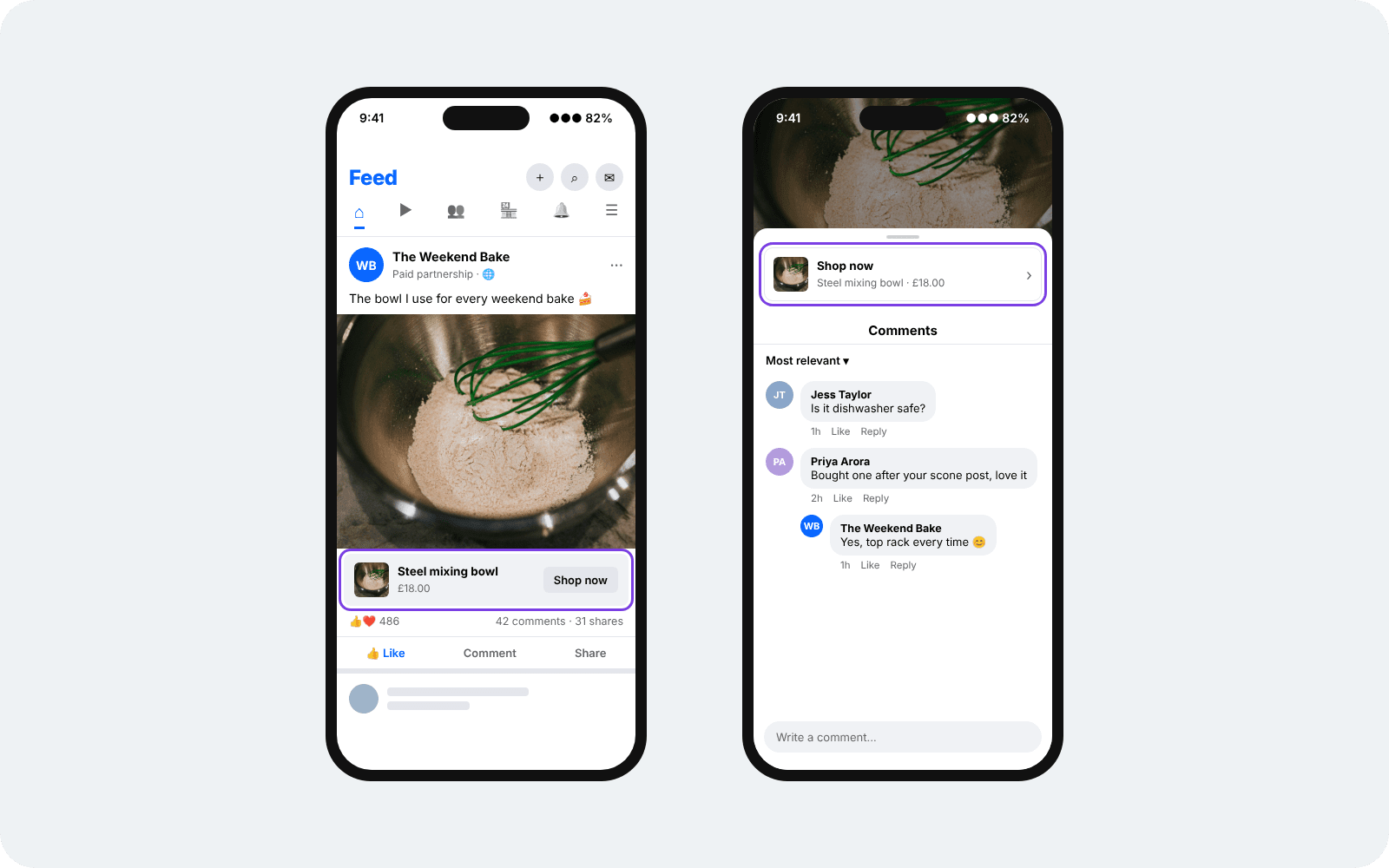
You connect an existing affiliate account from one of the partner programmes rather than starting fresh. The feature sits in your Professional Dashboard under 'Monetisation'.
Meta has confirmed these markets and partners so far:
| Market | Partner |
|---|---|
| United States | Amazon, eBay, Temu |
| Singapore, Malaysia, Vietnam, Indonesia, Philippines, Thailand, Taiwan | Shopee |
| Brazil | Shopee, Mercado Libre |
| Mexico | Mercado Libre |
The UK is absent from that list. Meta has said more markets will follow without confirming a date, so the honest answer for now is that it is coming rather than here.
Two things worth doing: check the ‘Affiliate partnerships’ tab in your Professional Dashboard occasionally, since it appears once your region is supported, and build your audience in the meantime, because the tool rewards creators who already have one.
Meta sets out the detail in its announcement for creators.
Affiliate marketing in Facebook groups without getting banned
Most people start by joining groups and posting links. Moderators remove them, the account gets flagged, and the few clicks that arrive come from people with no intention of buying.
The approach that works removes the link from the post entirely.
Find groups where your niche gets discussed, then answer questions properly. Someone asks which robot vacuum handles pet hair, you write a useful reply covering what you have tried and what went wrong.
No pitching or link spamming. People who find the answer helpful click your name, and your profile carries the link.
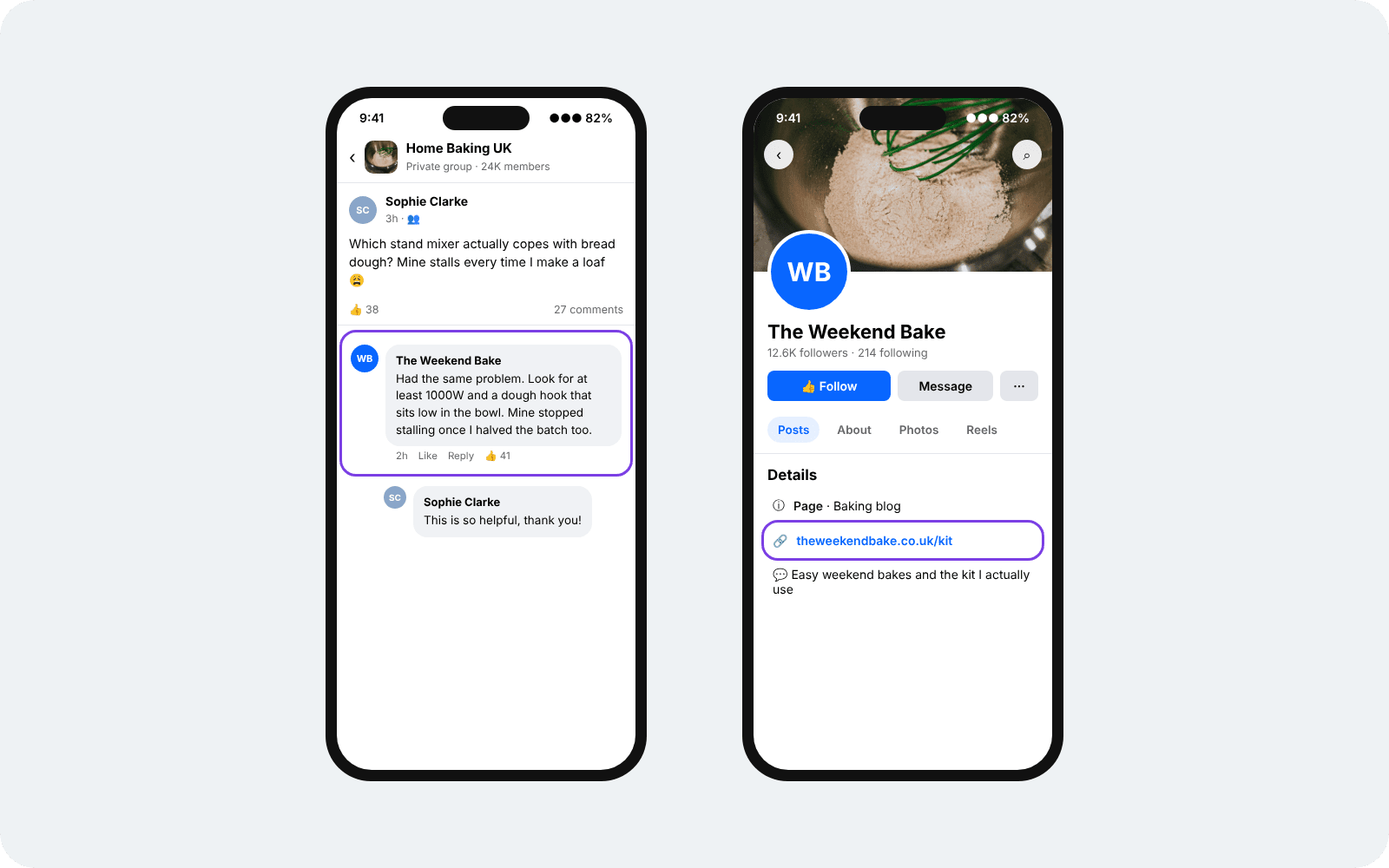
Traffic that arrives this way behaves differently. Somebody who went looking for you has already decided you know something, which is a different visitor from anyone who tapped a link in their feed.
Choosing groups
- Look for 10,000 to 40,000 members, where posts stay visible and people reply
- Skip anything above 500,000, since posts vanish within minutes
- Read the pinned rules before posting, as many groups ban promotional content outright
- Favour groups organised around a specific problem rather than a broad topic
- Add groups over a fortnight rather than joining twenty in one sitting, since a burst of joins looks automated
Matching the message to the room
A side hustle group responds to earning more. A group for people in corporate jobs responds to building something alongside the day job. Reading how a room talks before you contribute tells you which angle lands.
The audience also shapes which programmes are worth mentioning. Freelancers and small business owners respond to tools that save them time, and software programmes tend to pay recurring commission where consumer goods pay once. See affiliate marketing on LinkedIn for how that category behaves.
Most of what you post in a group should carry no commercial purpose. That ratio keeps you welcome.
Pages, profiles and where your links go
Each surface reaches a different set of people, and each handles links differently.
| Page | Profile | Group post | |
|---|---|---|---|
| Who sees it | Anyone who follows or finds it | People who know you | Members of that community |
| Where a link fits | Posts, bio, cover button | Posts, bio | Post text, comments |
| Analytics | Full reporting on clicks and reach | Limited | None |
| Scheduling | Available | Unavailable | Unavailable |
| Best for | A permanent home for your links | Warm traffic and recommendations | Reaching people outside your network |
A page is worth setting up early. It gives you a cover button pointing wherever you want, a bio field that holds a link permanently, and reporting that shows which posts drive clicks. None of that exists on a personal profile.
Profiles still earn their place. Recommendations from someone you know carry weight, and the traffic converts well even at small volumes. The same holds for Instagram affiliate marketing, where the account and the person behind it are the same thing.
Groups work best as a way to send people toward the other two, following the approach above.
One practical point. Facebook shortens and previews links in posts, so check how yours renders before you rely on it. A tracking link that displays as a string of parameters looks less trustworthy than a clean one.
Setting up
- Create a Page and pick the right category
Pages sit apart from your personal profile and cost nothing to create. Choose a category matching what you post about, since it decides which fields appear on your Page and how Facebook files you in search. Name it around the topic rather than yourself, so it reads as a place for a subject.
- Fill the fields that hold a link permanently
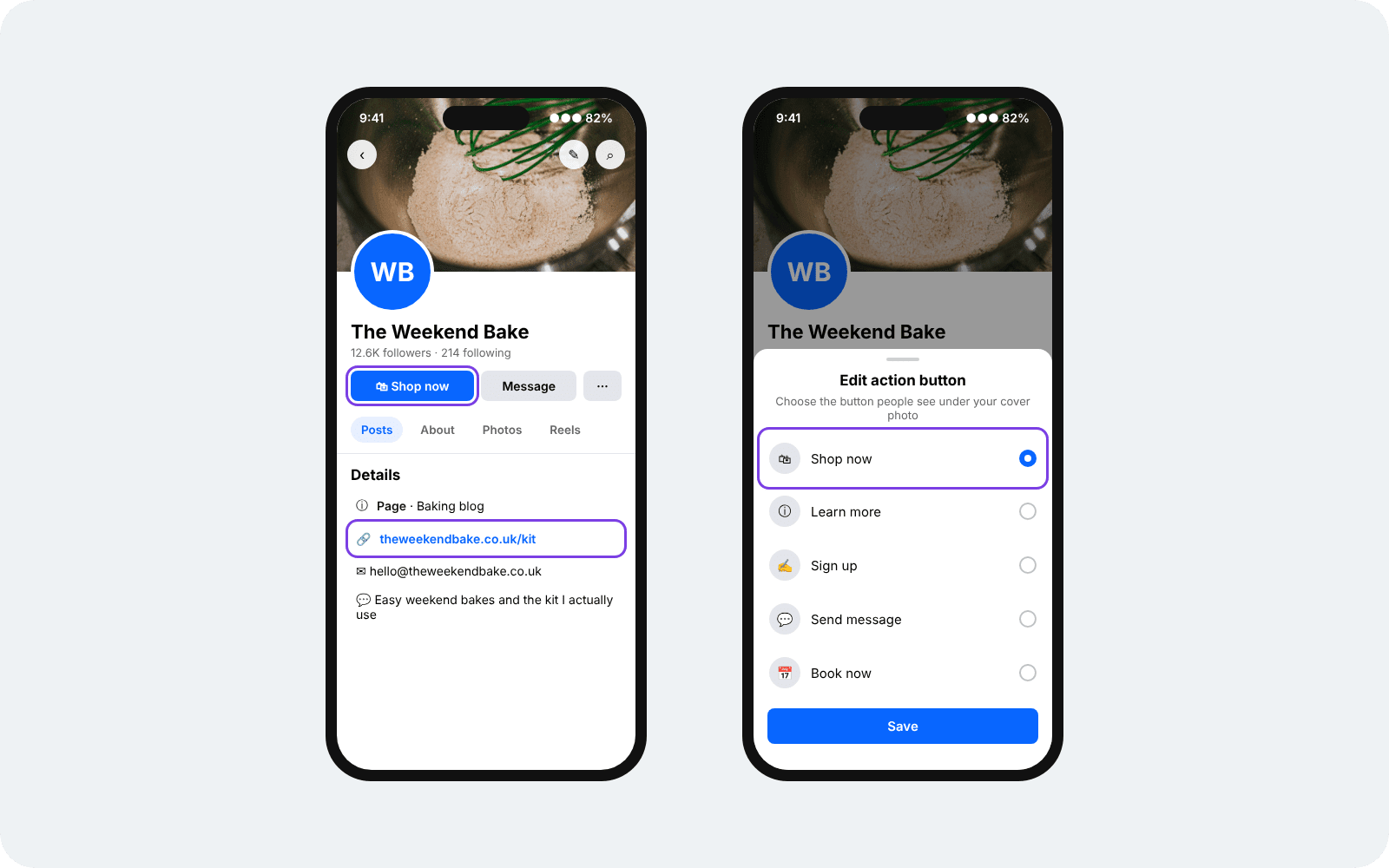
Your Page details hold a website link that stays put. The button under your cover image takes another, with Shop Now, Learn More and Sign Up among the options. Both survive every post you publish, which makes them the most valuable space you own here.
- Publish a few posts before promoting anything
New pages carrying a link in their first post reach almost nobody. Build up enough content to look like somewhere worth landing, then start adding links once there is something behind them.
- Join a network and create your link
Applications ask where you post, so name your page and the groups you contribute to. Brands review each application separately, and a page with one clear subject reads better than a profile covering everything.
- Check how the link renders before you rely on it
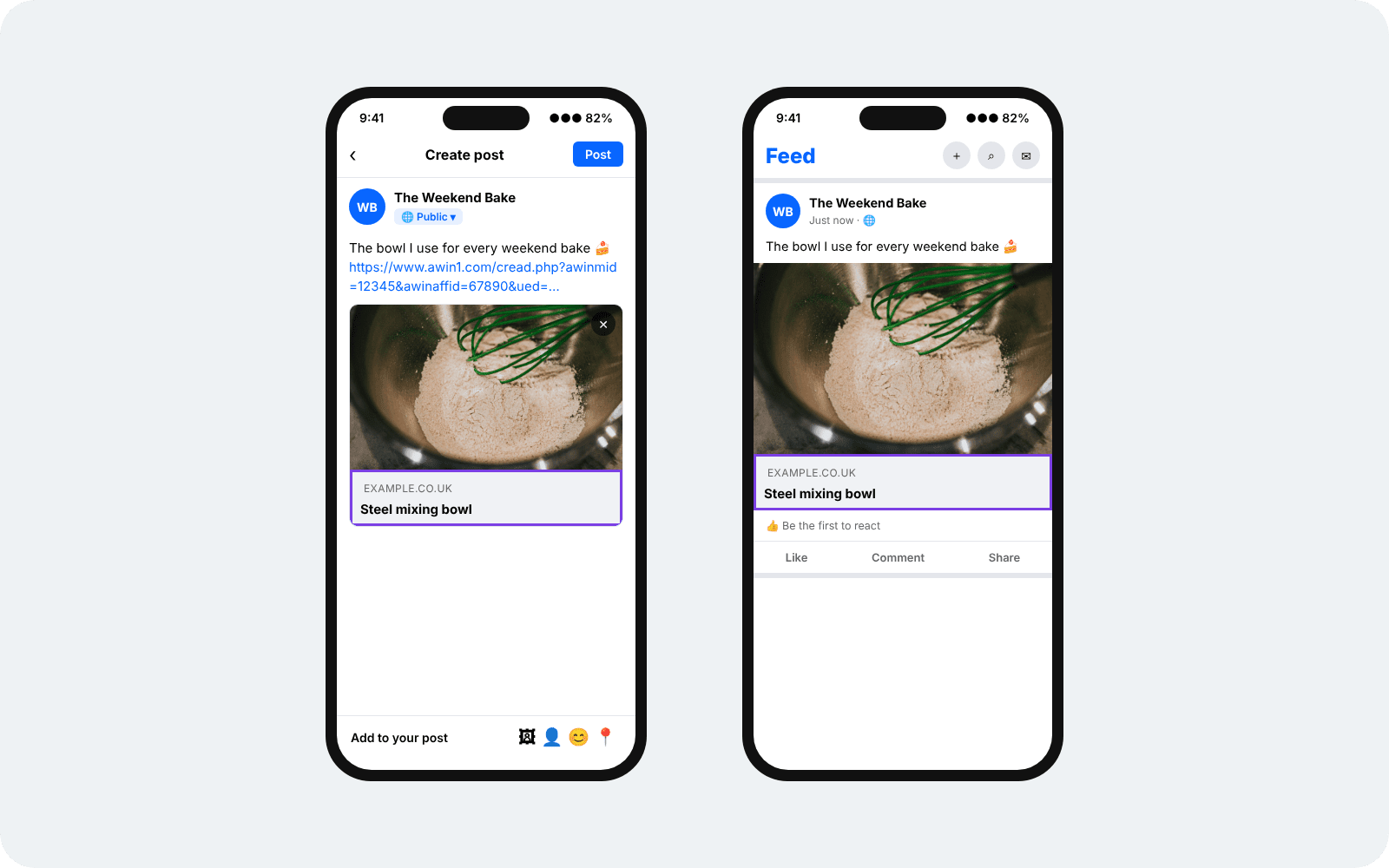
Facebook pulls a preview image and headline from wherever your link lands, and a tracking link sometimes displays the redirect domain instead of the retailer.
Draft a post, look at what appears, and confirm the click reaches your reporting while you are there.
Pick your niche once you know which brands run programmes in it. The Advertiser Directory lets you browse brands by sector and see what each one pays.
Registration is free. Create your free Awin publisher account and start browsing programmes.
Can you run Facebook ads to affiliate links?
Sometimes. Two separate sets of rules decide it.
Meta reviews what you advertise, and ads pointing straight at an affiliate link often get rejected. Sending traffic to your own content, a review or a comparison page carrying the link, gives a cleaner landing experience and usually clears review.
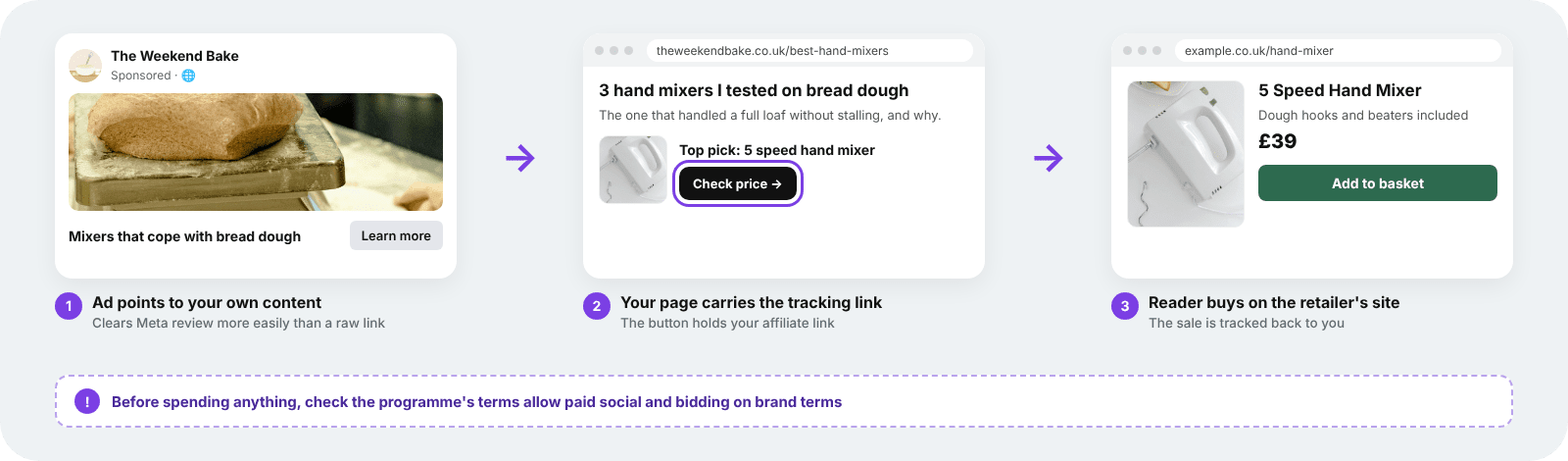
The bigger constraint comes from the brand. Many programmes restrict paid traffic, some ban bidding on their brand terms, and others prohibit paid social entirely. Those rules sit in each programme's terms, and breaking them can cost you the commission and the partnership.
Three things worth doing before spending anything:
- Read the programme terms for every brand you plan to advertise
- Ask the affiliate manager directly when the terms are unclear
- Test organically first, since a post that earns nothing for free rarely improves with budget behind it
Ad costs on Meta can eat most of the commission before a sale converts. Most publishers do better building organic reach first.
What works and what gets ignored
Facebook shows people what other people react to. A post that gets comments and shares in the first hour reaches further than one that sits still, which means the format matters as much as the product behind it. The patterns below hold across most niches.
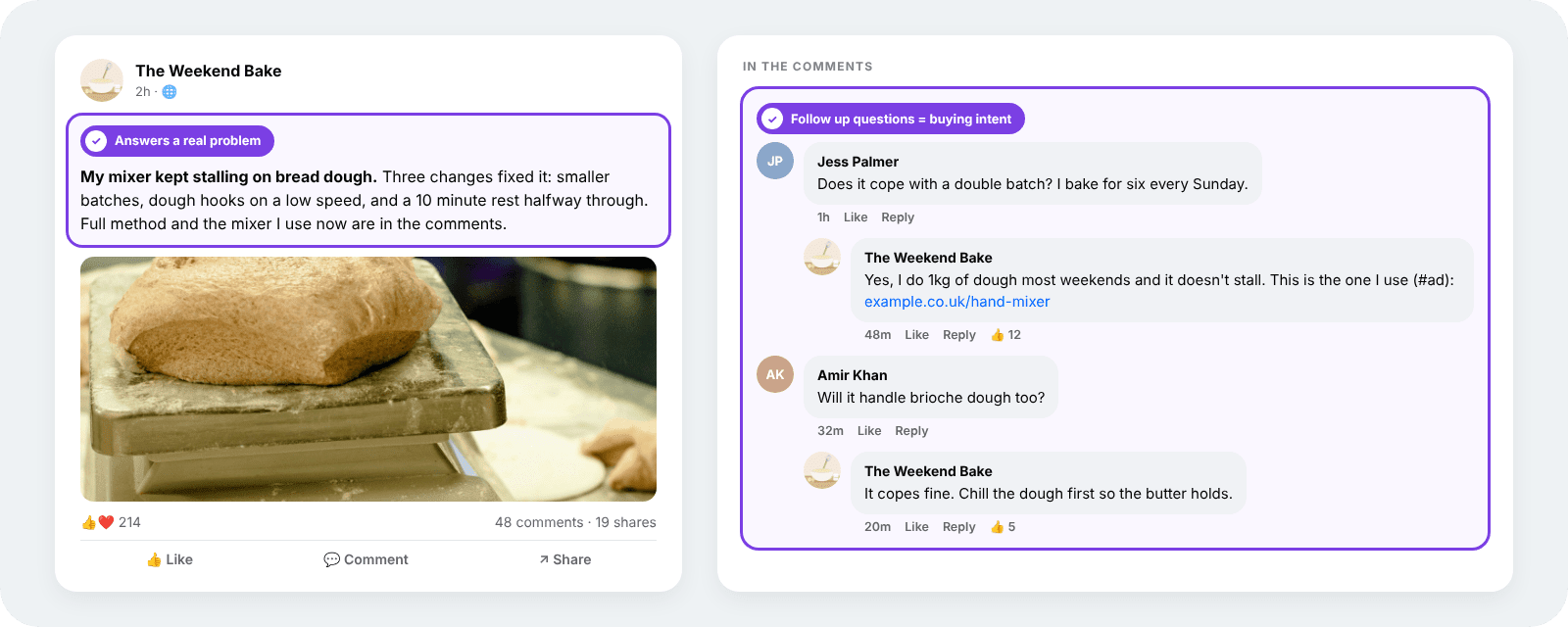
- Answers outperform announcements. A post explaining how you solved a problem earns attention. A post telling people about a product does not.
- One product beats a list. Covering a single item properly gives you something to say. Roundups of ten things read as filler and convert poorly.
- Photos of the actual thing. Your own images of a product in use do better than the retailer's press shots, which readers have already scrolled past elsewhere.
- Timing follows the calendar. Facebook skews toward planned purchases, so seasonal posts land best: garden furniture in April, heating in October, gifts from November.
- Comments are where the sale happens. Someone asking a follow up question is close to buying. Replying properly matters more than the original post.
Short video travels well between platforms, so anything you make for Reels can run elsewhere with the links placed differently. Our guide to TikTok affiliate marketing covers where links go there.
Disclosure on Facebook
Every post carrying a link has to read as commercial before someone gets into it. Facebook makes that harder than most platforms, since longer posts collapse behind a See More cut and anything below it goes unread.
- Lead with the label, above the cut, where it stays visible without a tap
- Stick to "ad" or "#ad", which the ASA accepts where terms like affiliate and gifted fall short
- Cover group posts as well. Community rules and advertising rules apply separately, so meeting one leaves the other open
- Use the branded content tool where a brand has paid you directly, adding a paid partnership label that sits alongside your own wording
Getting this right protects the account as well as the compliance position. Undisclosed commercial content risks removal and repeat issues affect what Facebook shows to your audience.
Flat fees for posts work on different terms. Our influencer partnerships hub sets out how those arrangements run.
The ASA publishes detailed guidance on labelling affiliate content.
Common questions
How do you do affiliate marketing on Facebook?
Share a tracking link through a page, your profile, or answers you post in groups. The retailer pays commission when someone buys through it.
Do you need a page, or is a profile enough?
A profile works. A page gives you analytics, post scheduling, a permanent bio link and a button under your cover image, none of which a personal profile offers. Most creators end up running both.
Can you post affiliate links in Facebook groups?
Some groups allow it but most do not. Check the pinned rules before posting. The approach that works across more groups is contributing useful answers and letting people find the link on your profile.
Is Facebook Affiliate Partnerships available in the UK?
Not yet. Meta launched it in March 2026 across the United States, parts of Southeast Asia and Latin America, and has said more markets will follow. Check the Affiliate partnerships tab in your Professional Dashboard to see when it reaches your account.
How much can you earn?
Commission rates are set by each brand rather than by Facebook, so earnings depend on what you promote and how well it suits your audience. Expect months rather than weeks before the numbers mean anything.
Getting started
Pick one group where your niche gets discussed and spend a week answering questions without posting anything promotional. Set up a page in the meantime and put your link in the bio.
That order matters. People check the profile before they trust the link, so having somewhere worth landing on comes first.
Find the brands you already recommend. Sign up and start earning commission