YouTube Affiliate Marketing: Links and Shopping Tags
Written by Edward Cranmer on 15 minute read
Where affiliate links belong on YouTube, how Shopping product tags work in the UK, and how commission compares to ad revenue.

YouTube behaves more like a search engine than a social feed. People type in what they want to know, land on a video made two years ago, and buy something because of it. A review filmed once keeps working, and viewers arrive already looking for the thing you are talking about.
There are two ways to earn. Anyone can place links in their description and pinned comments, or you can tag products directly in the video through YouTube Shopping, which launched in the UK in July 2026 and pays commission through the retailer.
This guide covers where links belong, how Shopping tags work and who can use them, what to promote, and how commission sits alongside ad revenue. The wider principles apply across affiliate marketing on any channel.
The two ways to earn commission on YouTube
Both routes pay you a percentage of a sale. What separates them is where the link lives and who can use it.
Affiliate links go in your description or a pinned comment. You join a network, generate a tracking link, and paste it in. No approval from YouTube required, no subscriber threshold, and you can promote anything sold online.
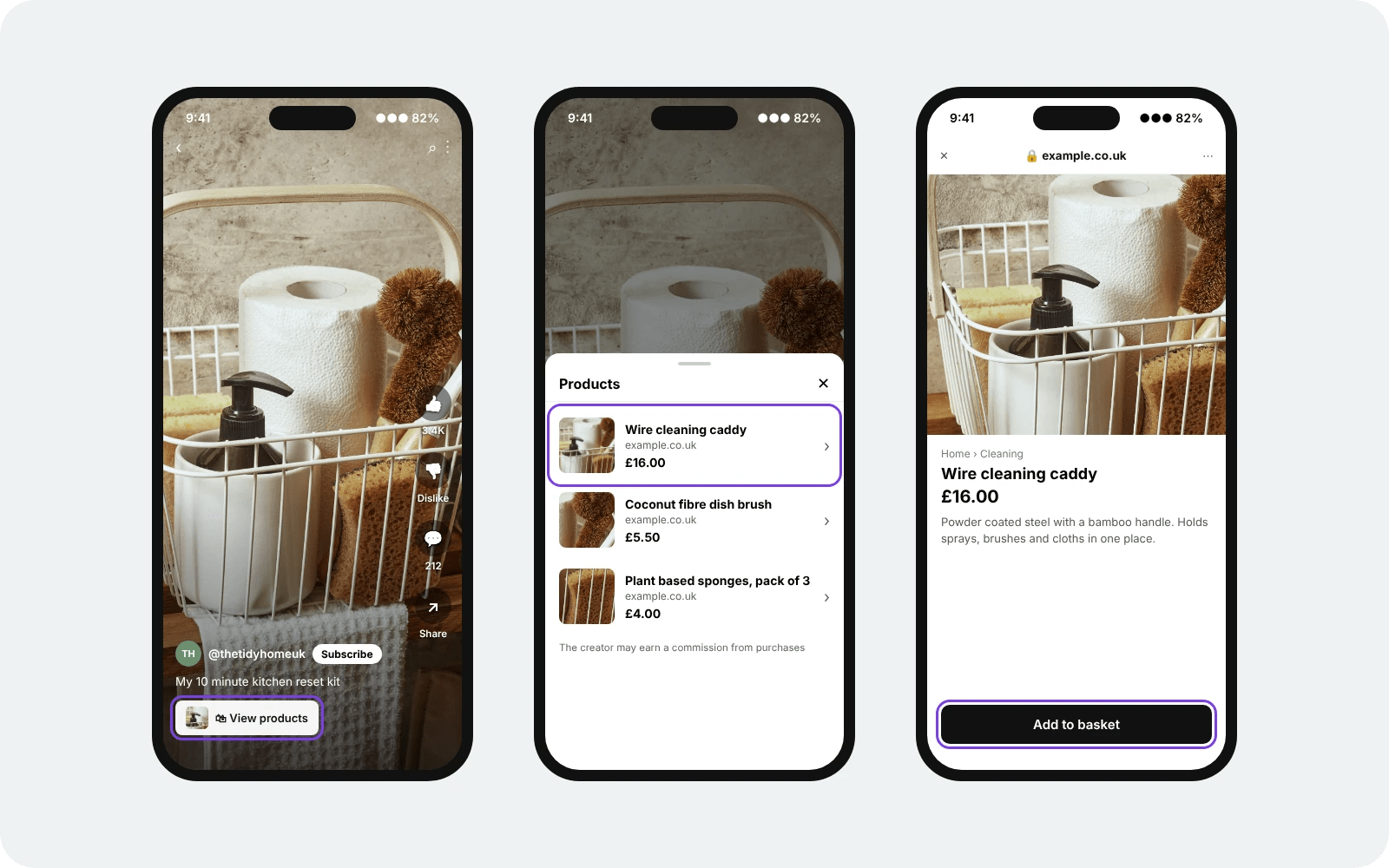
YouTube Shopping works inside the video itself. You tag products from participating retailers, a shopping row appears under your content, and viewers tap through to buy from the retailer.
| Affiliate links | YouTube Shopping tags | |
|---|---|---|
| What you can promote | Anything sold online | Products from participating retailers |
| Where it appears | Description, pinned comment | Under the video, in Shorts, during livestreams |
| Entry requirement | Approval from each brand | YouTube Partner Programme, 500 subscribers |
| Who pays you | The affiliate network | YouTube, via the retailer |
| Available in the UK | Yes | Yes, since July 2026 |
Running both makes sense. Tags catch viewers watching on a phone who never open a description, while links cover every product outside the participating retailer list.
Our guide to social media affiliate marketing covers what changes elsewhere.
YouTube Shopping in the UK
YouTube launched its Shopping Affiliate Programme in the UK on 23 July 2026. Seven retailers came on board at launch: Debenhams, M&S, Boots, Currys, Etsy, Next and Wayfair, with more expected as the programme expands. Awin supports the launch as YouTube's affiliate platform partner.
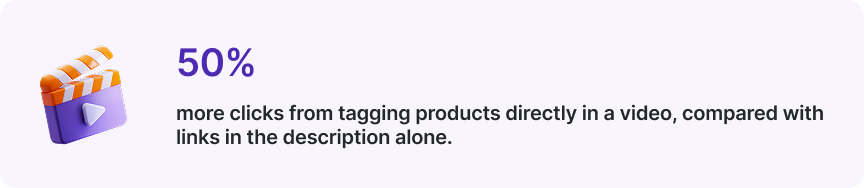
-Source: YouTube, quoted in Awin's UK launch announcement
Eligibility sits lower than most creators expect. You need to be in the YouTube Partner Programme with at least 500 subscribers, after YouTube recently reduced the threshold.
Tagging happens in YouTube Studio. You search for a product, attach it to a video, a Short or a livestream, and the shopping row appears for viewers. YouTube is also rolling out automatic tagging that identifies products shown on screen.
One thing to watch: at the time of writing, Google’s help pages still leave the UK off the list of eligible countries. The documentation has not caught up with the launch yet. Check the Earn tab in YouTube Studio, which shows what your channel can access today.
Where your links go
Placement decides how many people ever see your link.
| Placement | Best for | Watch out for |
|---|---|---|
| Description | Multiple products, full detail | Sits below the fold on mobile until someone taps |
| Pinned comment | Drawing attention to one link | Gets buried when comments are busy |
| Shopping row | Single products from participating retailers | Requires programme access |
| Cards and end screens | Sending people to your own site | Links to approved destinations only |
| Community posts | Reaching subscribers between uploads | Needs an existing audience |
The description is where most links live, and the first two lines carry the weight. Anything below that stays hidden until a viewer taps to expand, so put the link people need at the top rather than in a list of twelve.
Pinned comments work as a second chance, catching anyone who scrolled past the description without opening it.
Say it out loud as well. Telling viewers the link is below costs you three seconds and lifts clicks more than any formatting trick.
Attribution gets complicated here, since someone watches on a phone in the evening and buys on a laptop the next day. Our guide to affiliate tracking and attribution covers what still counts as yours.
Getting set up
- Set your upload defaults first
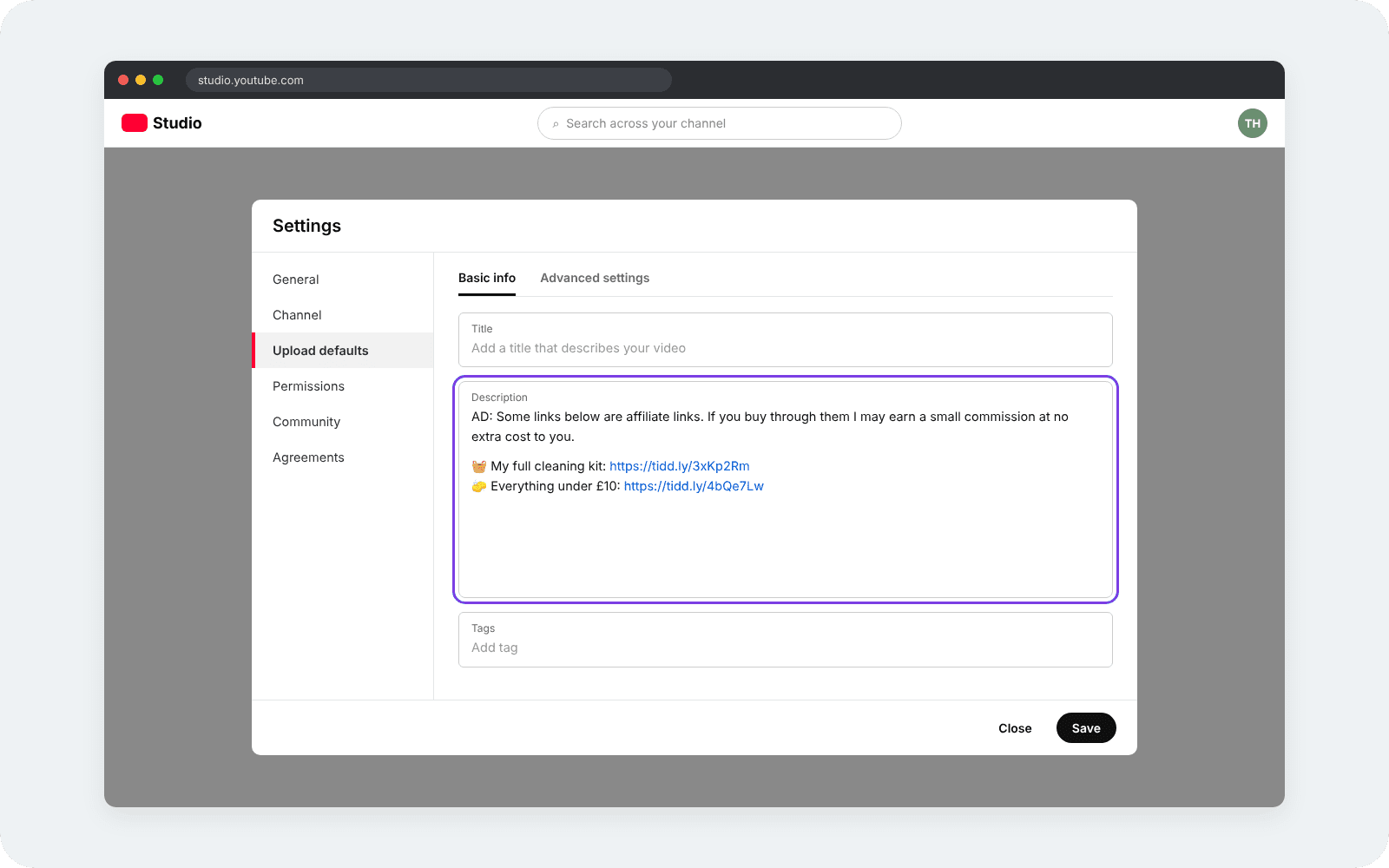
YouTube Studio holds a default description that applies to every new upload. Put your disclosure line and any permanent links in there once, and they appear on everything you publish without you retyping them.
- Join a network and name your channel
Applications ask what you make and who watches. Give your channel URL, your subscriber count and the categories you review, since a channel with a clear subject reads better than one covering everything.
- Generate one link per product
Create a separate tracking link for each product rather than reusing one across a series. A description holding eight links is unreadable in reporting when they all look the same.
- Build your first two lines around the main link
Everything below those two lines stays hidden on mobile until someone taps to expand. Lead with the link most viewers came for, then let the rest sit underneath.
- Pin a comment as a second placement
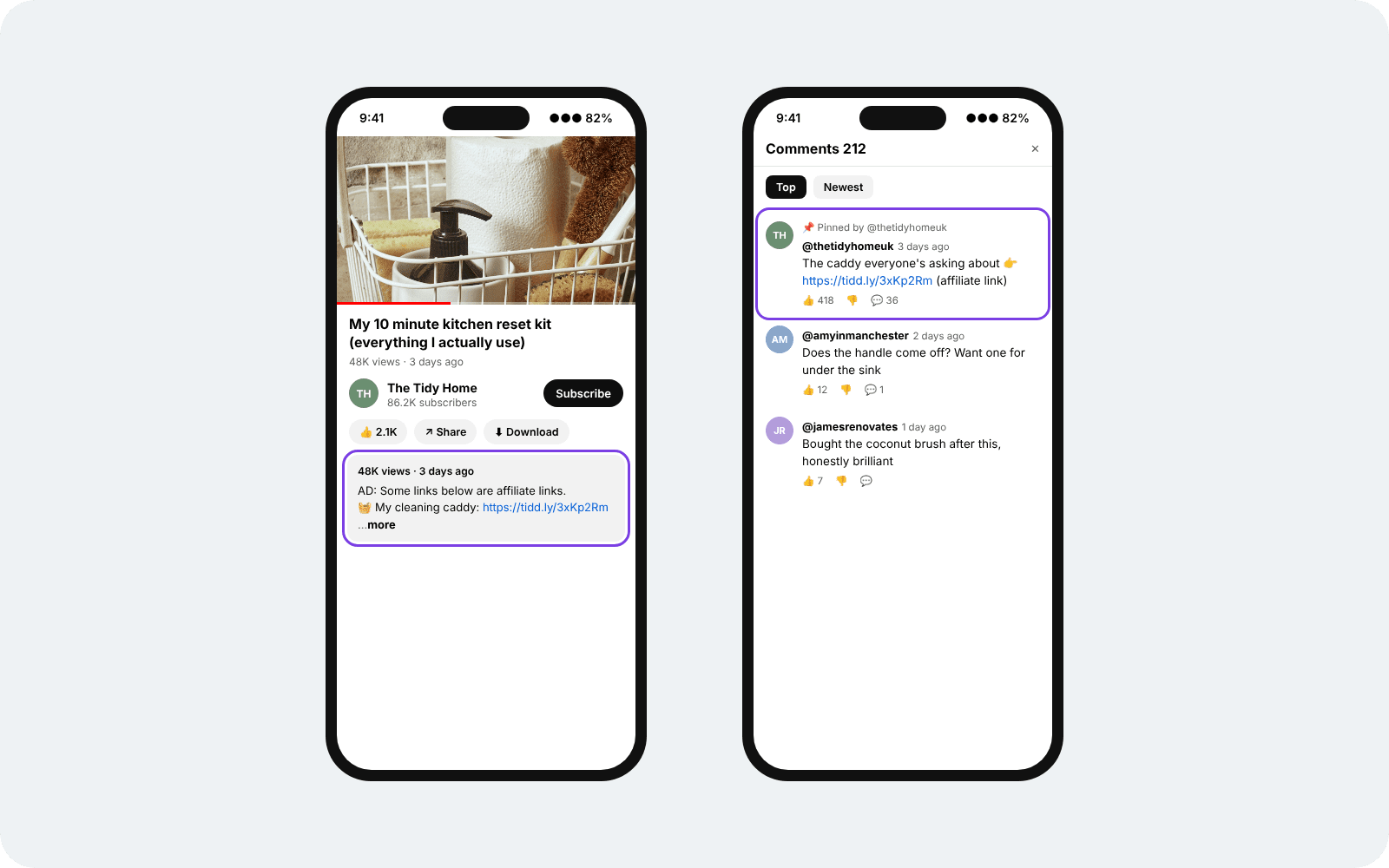
Post the video, then pin a comment naming what the link leads to. This catches anyone who watched without opening the description, which on mobile is most of them.
- Check the Earn tab, then test from a phone
Open the Earn tab in Studio to see whether Shopping is available on your channel. Then tap your own link the way a viewer would, complete the journey to the retailer, and confirm the click reaches your reporting.
Look at what runs in your categories before planning a video around a product. The Advertiser Directory lets you search affiliate programmes by category.
Registration is free. Create your free Awin publisher account and see which brands fit your channel.
What to promote
- Tech and gear. The strongest category on YouTube. People research laptops, cameras, headphones and phones by watching someone use them, and they arrive ready to buy.
- Filming equipment. An underrated one. Creators asking how you shoot your videos are a built in audience for cameras, lighting, microphones and editing software, and the recommendation carries weight because you use the thing on camera.
- Beauty and skincare. Routines, comparisons and honest reviews of things people repurchase. Boots sits among the UK Shopping launch retailers, which makes tagging straightforward here.
- Home and DIY. Tools, appliances and furniture, where a video showing the job done answers the question a spec sheet cannot. Currys, M&S and Wayfair all joined the launch list.
- Software and courses. Higher commission, often recurring, and well suited to tutorials where the tool is the subject rather than a mention. The same products sell through affiliate marketing on LinkedIn, where the audience is already thinking about work.
Match the product to what people already come to you for. A channel about cycling converts on bike gear and earns nothing on kitchen appliances, whatever the rate looks like.
Affiliate commission and ad revenue
These get confused constantly. They are separate income streams and most creators run both.
| Ad revenue | Affiliate commission | |
|---|---|---|
| What triggers payment | Views and ad impressions | A purchase through your link or tag |
| Who pays | YouTube, from advertiser spend | The retailer, through a network or YouTube |
| Entry requirement | Partner Programme membership | None from YouTube for description links |
| What it depends on | Watch time and audience location | What you promote and how well it fits |
| Ceiling | Tied to view count | Tied to order value |
Ad revenue rewards reach. Affiliate commission rewards relevance. A video with 5,000 views recommending a £900 camera can out-earn one with 200,000 views about something nobody buys.
That is why RPM figures can be misleading. Revenue per mille is what YouTube pays per thousand views, so anyone quoting it is describing one income stream. It tells you nothing about what the same video earns from a link in the description.
The two stack. The same review can carry ads, an affiliate link and a Shopping tag, each paying for something different.
What earns on YouTube
Five formats do most of the earning, and each one answers a question someone is already searching for.
- Reviews of one product. Someone searching a product name wants a verdict. A focused review answers that better than a roundup, and it ranks for a term with buying intent behind it.
- Comparisons. Two products, side by side, with a recommendation at the end. These catch people at the last stage before purchase, which is where commission gets earned.
- Tutorials. Showing how to do something naturally involves the tools you use. The recommendation comes as part of the answer rather than as a pitch.
- Unboxings and first impressions. Strongest at launch moments, when search volume spikes and nobody has published yet.
- Shorts. Quick demonstrations that push viewers toward a longer video or carry a tag of their own. Anything filmed for TikTok affiliate marketing runs here with minimal editing.
Search is what makes this pay. A review filmed in 2024 still earns in 2026 because people keep looking up that product, and the video sits there answering them.
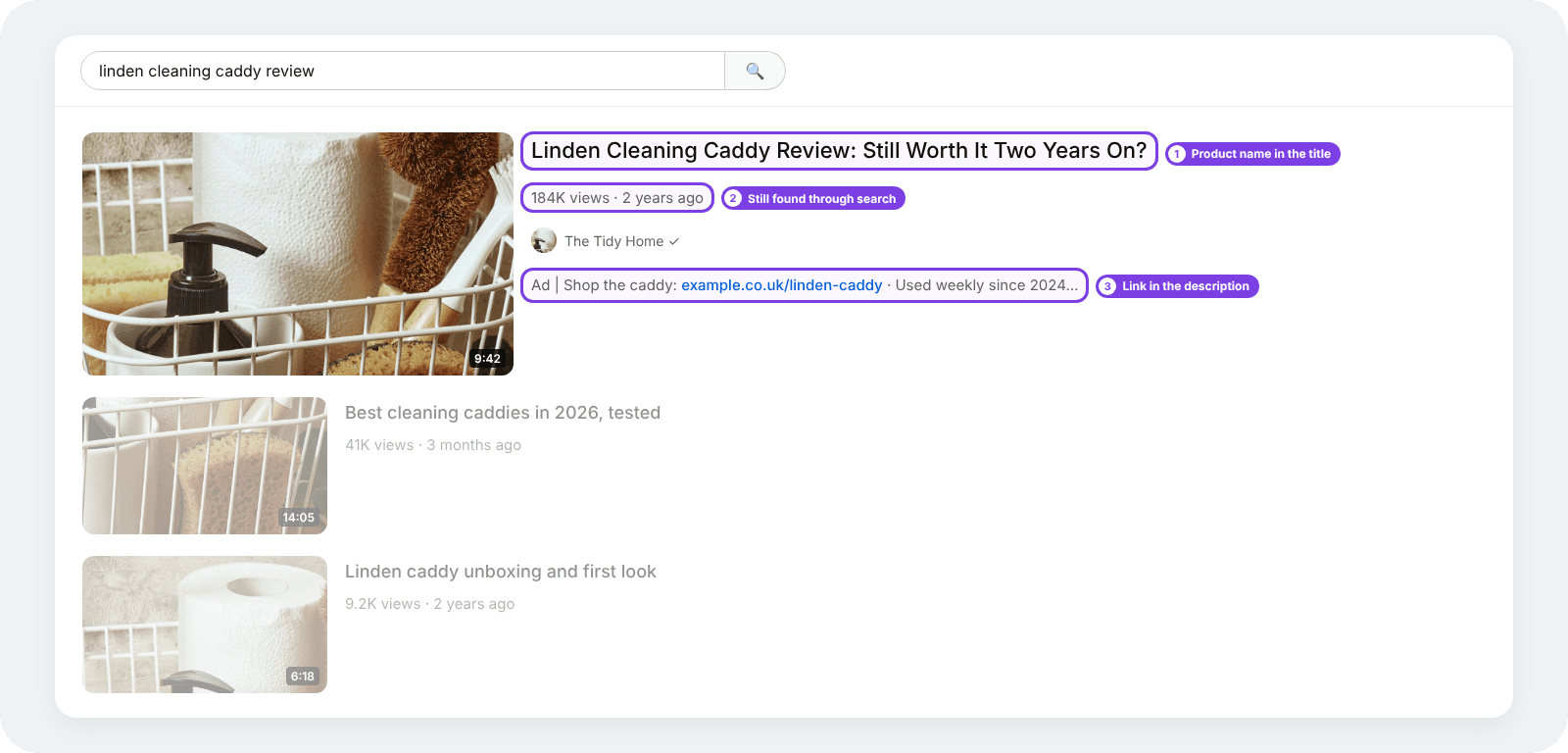
Titles carry weight here alongside thumbnails: someone typing a product name needs to see it in your title.
What to expect
Early numbers are small. Creators posting about their first months describe earning under a £100 a month at first, and the ones earning more talk about it taking a year or two of consistent uploads.
Production is what slows YouTube down. A review takes filming, editing and thumbnail work, so you might publish four videos a month where a TikTok creator publishes forty. Fewer attempts means slower learning.
The back catalogue is the payoff. Every video keeps working, so month 12 earns from everything published in months one to 11. That compounding is the reason people stay with it.
-Source: YouTube, UK launch announcement
One other platform pays the same way. Pinterest affiliate marketing covers how a pin published in spring keeps returning traffic the following year, for much the same reason a review does.
Two things worth tracking early; click through rate on your links tells you whether people are finding them, and conversion rate tells you whether the product matched the audience.
Low clicks is a placement problem. Clicks without sales is a product problem.
Disclosure on YouTube
Anything you earn from online has to be flagged as a commercial or ad before a viewer gets into it. YouTube gives you a built-in tool for this, and on its own it leaves gaps.
- Tick the paid promotion box in Studio, which adds a disclosure banner to the start of your video
- Say it on camera, early, since most viewers never read a description
- Write it above your links rather than at the bottom of the description
- Cover Shorts and livestreams, which carry the same requirement as long form video
The Studio banner appears briefly at the start, so anyone arriving through a timestamp or joining a stream partway through misses it. The spoken version is what fills that gap.
Flat fees for videos work on different terms. Our influencer partnerships hub sets out how those arrangements run.
The ASA publishes detailed guidance on labelling affiliate content.
YouTube affiliate marketing FAQs
Can you do affiliate marketing on YouTube?
Yes. Links in your description or a pinned comment need no approval from YouTube and no minimum audience. Joining the Shopping Affiliate Programme has its own requirements.
How many subscribers do you need?
None for description links. YouTube Shopping requires Partner Programme membership and at least 500 subscribers, after YouTube reduced the threshold.
Is YouTube Shopping available in the UK?
Yes, since 23 July 2026. Debenhams, M&S, Boots, Currys, Etsy, Next and Wayfair joined at launch, with Awin as the affiliate platform partner. Google's help pages have been slower to update, so check the Earn tab in YouTube Studio for what your channel can access.
Do you need the Partner Programme for affiliate links?
No. The Partner Programme covers ad revenue and Shopping tags. Affiliate links from a network work on any channel, whatever its size.
How much do YouTube affiliates earn?
It depends on what you promote rather than how many views you get. A small audience recommending expensive products can out- earn a large one recommending cheap ones.
Your first three videos
Pick a product you already own and use regularly. Film an honest review, put the link in the first two lines of your description, and say it out loud on camera.
Do that three times before judging anything. Three videos and their click data teach you more than any amount of planning.
Retailers across every category run programmes on the network. Sign up and start earning commission